Color Identifier is a real-time camera color picker: aim at a surface and read the selected color as the view updates. See a basic name such as yellow, white, green or red, a more specific name from 800+ named shades, and HEX, RGB and CMYK codes. Switch on the flash when needed and save useful colors without ending the session. Saving dozens in one session requires the applicable subscription; the standard iPhone flow allows five saves without one. Lighting and camera processing affect the recorded color.
Capture a more useful color reference
Choose the surface, not its reflection
Pick an area with one material and one color. A glossy highlight can look close to white even when the object itself is dark or saturated.
Find even light
Avoid a patch split between sunlight and shadow. Move away from strong colored reflections, such as a bright curtain casting light onto the object.
Frame the area and steady the phone
Keep the target large enough to select without including a border or background. Give the view time to settle after moving the camera.
Read several nearby points
Check whether the area is consistent. If it is textured or unevenly lit, choose a representative region and keep that limitation in mind.
Save the reference with context
Record what the object was and where you captured it. A code alone will not tell you whether the original was a wall, fabric or a screen.
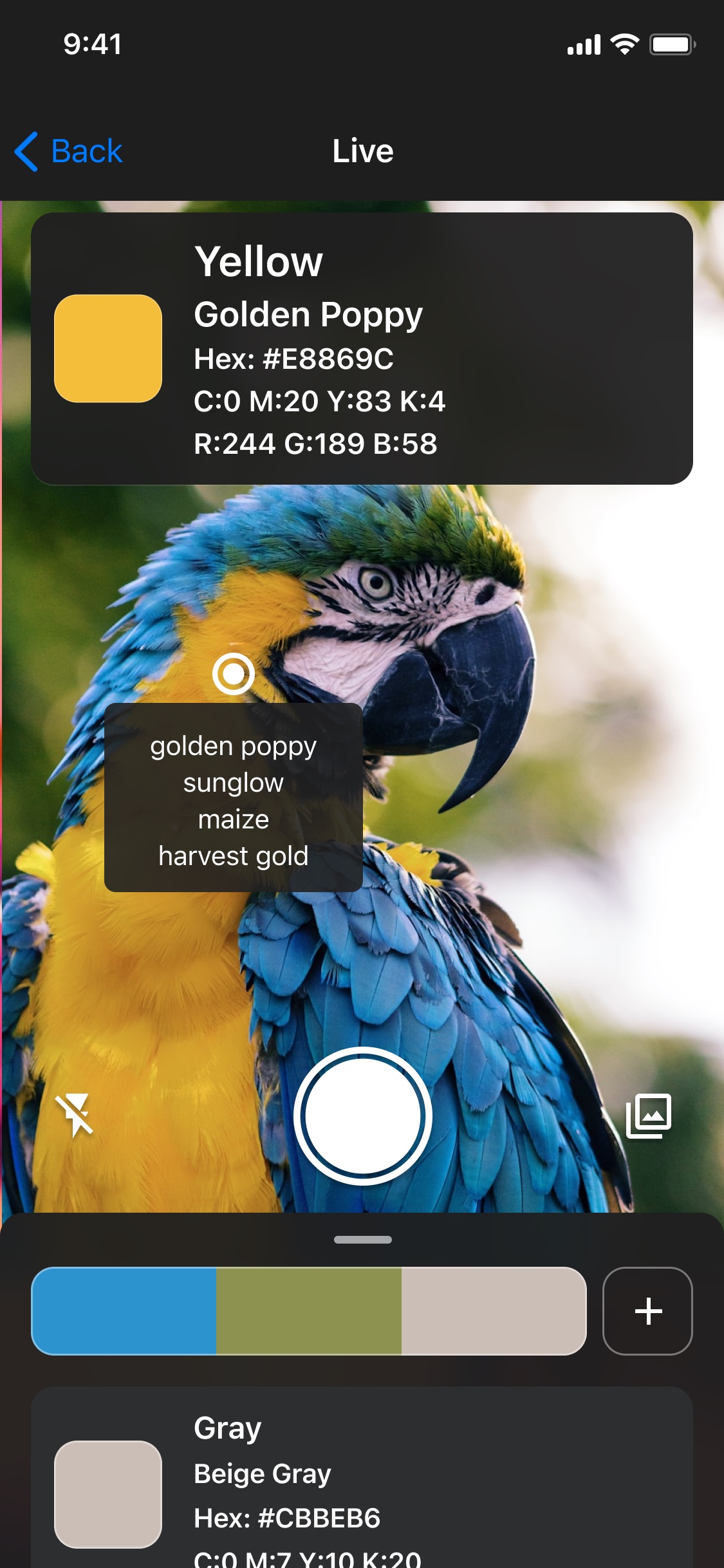
Identify colors live, without taking a separate photo
Open camera identification and move the selector over the surface you want to inspect. The result updates in real time as you aim at different areas. You can explore several objects without taking a separate photograph of each one.
Use it to collect the colors of a room, inspect a piece of clothing or record a shade while shopping. Start with a broad, evenly lit area so the selected color belongs to the material rather than a reflection or shadow.
Read a basic color and a more specific shade name
The basic name answers the quick question: is this yellow, white, green or red? The more specific web-style name helps describe the selected shade in greater detail, using a library of more than 800 named colors.
The naming library is broader than the small set of standardized CSS named colors. A descriptive name helps communicate a shade; HEX and RGB values are more useful when a design tool needs numerical channels. A name is not a paint brand or dye formula.
Get HEX, RGB and CMYK from the camera
Read the selected color as HEX, RGB and CMYK in the same camera workflow. Keep HEX or RGB when you need a digital design reference; CMYK can provide a starting reference for a print conversation.
The codes describe the camera-recorded color. CMYK is not a print proof: the final appearance depends on the output process, paper, inks and color management. Converting a reading does not make a physical sample more accurate.
Save colors as you scan, without starting over
Save a shade, point at the next one and save again while camera identification stays open. With the applicable subscription, you can collect dozens of colors in one session instead of limiting the visit to one reference.
The standard iPhone identification flow allows up to five saved colors per session without a subscription, then presents the upgrade option. Adding colors to an existing palette can have a separate palette limit. Check the offer in your version; saving dozens is not a promise of unlimited free use.
Turn on the flash when you need extra light
Use the camera flash or torch control on supported hardware to light the area in front of you. You can switch it during live identification rather than leaving the camera workflow.
Extra light can also introduce reflections or change the recorded shade. Try an evenly lit surface first, and avoid aiming at the brightest highlight. Flash availability does not mean flash guarantees a more accurate match.
Why the same object can give different codes
A white wall photographed in warm evening light may record as a warm neutral. Move the phone toward a window and the selected pixels may become cooler. The app is reading what the camera records, including those changes in light.
Exposure and white balance are also adjusted by the camera. A small code change after reframing is not proof that the material changed. For repeat references, keep the lighting and framing as similar as practical.
When a photo is better than a live scan
If you want a color from a logo, illustration or screenshot, use the original file. Photographing a screen adds unnecessary display and lighting effects. The saved-photo picker is also easier when you need time to inspect several areas of one image.
For a material that is in front of you, a camera reference can be convenient while shopping or gathering ideas. It is useful for documenting the approximate direction you like, rather than certifying a physical match.
Know what the reading cannot establish
A phone camera is not a calibrated instrument for determining an exact paint formula or manufacturer code. A low-quality source image cannot be repaired by converting its RGB values into a different notation.
Use the result for inspiration, communication and a shortlist. For a physical purchase or touch-up, compare a real sample in its intended setting or use an appropriate specialist measurement workflow.
How to use Color Identifier for this task
- Open camera identification and allow camera access.
- Aim at a clear surface and watch the result update live; use the flash control if needed.
- Read the basic name, detailed shade name and HEX, RGB or CMYK values.
- Save the colors you want as you scan; upgrade when the current save allowance requires it.
Find the shade. Keep the code.
Get Color Identifier to read colors live and collect the ones you want to use. Free to download; in-app purchases and save limits apply.


The browser tools are free. Mobile features, limits and purchases depend on the current app and platform.
Questions about identify color with camera
Does Color Identifier identify colors in real time?
Yes. Aim at the chosen area and read the live name and code as the camera view updates. You do not need a separate photo for each color.
Can I save several colors during one camera session?
Yes. Save colors as you move between samples. Collecting dozens requires the applicable subscription; the standard iPhone flow permits five saves without one. Existing palettes can have a separate limit.
Does the camera show color names as well as codes?
Yes. It shows a basic color name, a more specific name from 800+ named shades, and HEX, RGB and CMYK values. The detailed names are not a claim that CSS defines 800 standardized keywords.
Does the website connect to my camera?
No. The browser tools work with supported saved images and entered codes. Live camera identification belongs to the mobile app.
Can I turn on the flash during live color identification?
Yes, on supported hardware. Use the flash or torch control while the camera is open. Extra light can introduce highlights and alter the recorded color, so it is not a guarantee of a better match.
Should I expect an identical code in two rooms?
No. Different light sources, reflections and camera processing can change the recorded values. Keep the source context instead of assuming two captures are directly comparable.